
Stock photos
On this page
This page covers paid stock photos: searching a paid library beside the free ones, putting a photo in as a preview, licensing it with License & replace, and the Stock images ledger that records every stock photo in your app.
Ghostwriter licenses only from your own account, with your own key. 1994 never licenses for you, never holds a key of yours, and never routes your calls through its servers.
Which libraries
| Library | Status | Keys |
|---|---|---|
| Openverse, Unsplash, Pexels, Pixabay | Free, as on Images | As there |
| Demo stock (no charge) | For trying it out: made-up photos that charge nothing and call nobody | None. On in a local environment, or with GHOSTWRITER_STOCK_DEMO=true. Never in production, whatever the setting says. |
| Shutterstock | Search with your app's keys; license once the account is connected, or with an access token | SHUTTERSTOCK_API_KEY, SHUTTERSTOCK_API_SECRET, from your own Shutterstock app on an API subscription (a shutterstock.com web plan can't license through the API). Optionally SHUTTERSTOCK_API_TOKEN. SHUTTERSTOCK_SANDBOX: its sandbox, which charges nothing; on by default in a local environment |
| Getty Images, iStock | Coming | Your key must come from your Getty Images or iStock account rep, under your own agreement |
Keys go in .env only, and Ghostwriter reads them each time. Your keys stay on your site. Ghostwriter sends them only to the provider you chose, never to us.
Shutterstock's previews are its own watermarked preview address, shown only inside the panel: its licence has no comp licence for still images, so nothing of it is stored.
Connect account
Shutterstock licenses only for a person's own signed-in account. Searching needs only the keys; licensing needs the account connected once, per app (per tenant on a panel with tenancy):
- In your Shutterstock app (shutterstock.com/account/developers/apps), add the Callback URL the Settings row shows: a host name and path such as
cms.example.com/admin/ghostwriter/libraries/shutterstock/callback, withouthttps://. It's built fromAPP_URL, so set that to the address people use. - In Settings → Stock photos, click Connect account, sign in at Shutterstock and allow access. You come back to Settings, connected.
- Disconnect forgets the sign-in here. Shutterstock has no way to revoke a token from outside: delete the app at Shutterstock to revoke it.
Only managers connect and disconnect. The tokens are encrypted with the app's key and last an hour, renewed as needed. If the connection is lost (revoked, password changed), the License dialog says so and offers Connect again to managers.
To try it without a real account, GHOSTWRITER_STOCK_DEMO_CONNECT=true makes the demo library need connecting too.
An access token instead
Instead of connecting an account, the account owner can generate one access token and put it in .env. It's simpler where there is one account for the whole app, and needs no callback address:
- Sign in at Shutterstock as the account that licenses, and open your app on the developers page (shutterstock.com/account/developers/apps).
- Click Generate token. Choose the scopes
licenses.create,licenses.view,purchases.viewanduser.view, and nothing else. Copy the token (it startsv2/and doesn't expire). - Put it in
.envasSHUTTERSTOCK_API_TOKEN=…, thenphp artisan config:clear.
While it's set, every licence and account call uses it, for every tenant. Settings → Stock photos shows Using the token from .env in place of Connect account and Disconnect, and Check connection shows the account's subscriptions and the downloads each has left. The token is read from .env each time, and never shown. If Shutterstock refuses it (it was revoked, or lacks a scope), Check connection and the License dialog say so, and nothing is bought. To go back to Connect account, remove the variable.
The sandbox (SHUTTERSTOCK_SANDBOX=true) accepts the same token, charges nothing and sends watermarked files, so it's a safe way to try licensing end to end.
What editors see
Search in
When a paid library is set up, Find a photo gets a Search in select beside the search box:
- Free libraries: the free ones, as before.
- Each paid library, such as Demo stock (no charge).
- Everything: free and paid together, taking turns, so each library's best results come first.
It starts from the Default source in Settings, then remembers each person's last choice. Without a paid library there's nothing to choose, and the select isn't shown.
Each result has a chip with its source in one corner, and in the other Free or the cost the library gives before licensing, such as "1 download". Editorial-only images carry an Editorial chip (hover it for the restrictions). They're left out unless Include editorial images is ticked, because most pages are commercial use, which editorial images don't allow.
Paid libraries' photos never go to a model: their licences forbid using their images or captions for AI. They aren't ranked, and keep the library's own order, with the line "Shown in …'s order. Ghostwriter doesn't rank paid libraries." The tab's intro follows Search in too. The searches are chosen from your page and your own words, never from a library's captions.
When the field already holds a stock image that still needs something (a preview, say), the panel shows it first, under In this field now, with its comp and licence.
Insert preview
A free photo is used as before: Use this saves the file into the field.
A paid photo has Insert preview instead:
- The field gets a stand-in: a striped JPEG at the photo's shape, labelled with the library and the photo's ID ("Demo stock demo-1001 · preview, not licensed"). It holds nothing of the library's, so it's safe at a public address. Its file name is the licensed file's, such as
rocks-at-dusk-demo-demo-1001-ab12cd.jpg, and alt text comes from the library's title. - The watermarked comp is kept privately on the app's
localdisk underghostwriter/stock, never in the field's disk. A library whose terms allow nothing to be stored keeps only its own preview address. - The toast says: "Preview added. Only signed-in editors see the photo; license it before publishing."
The badge on the field
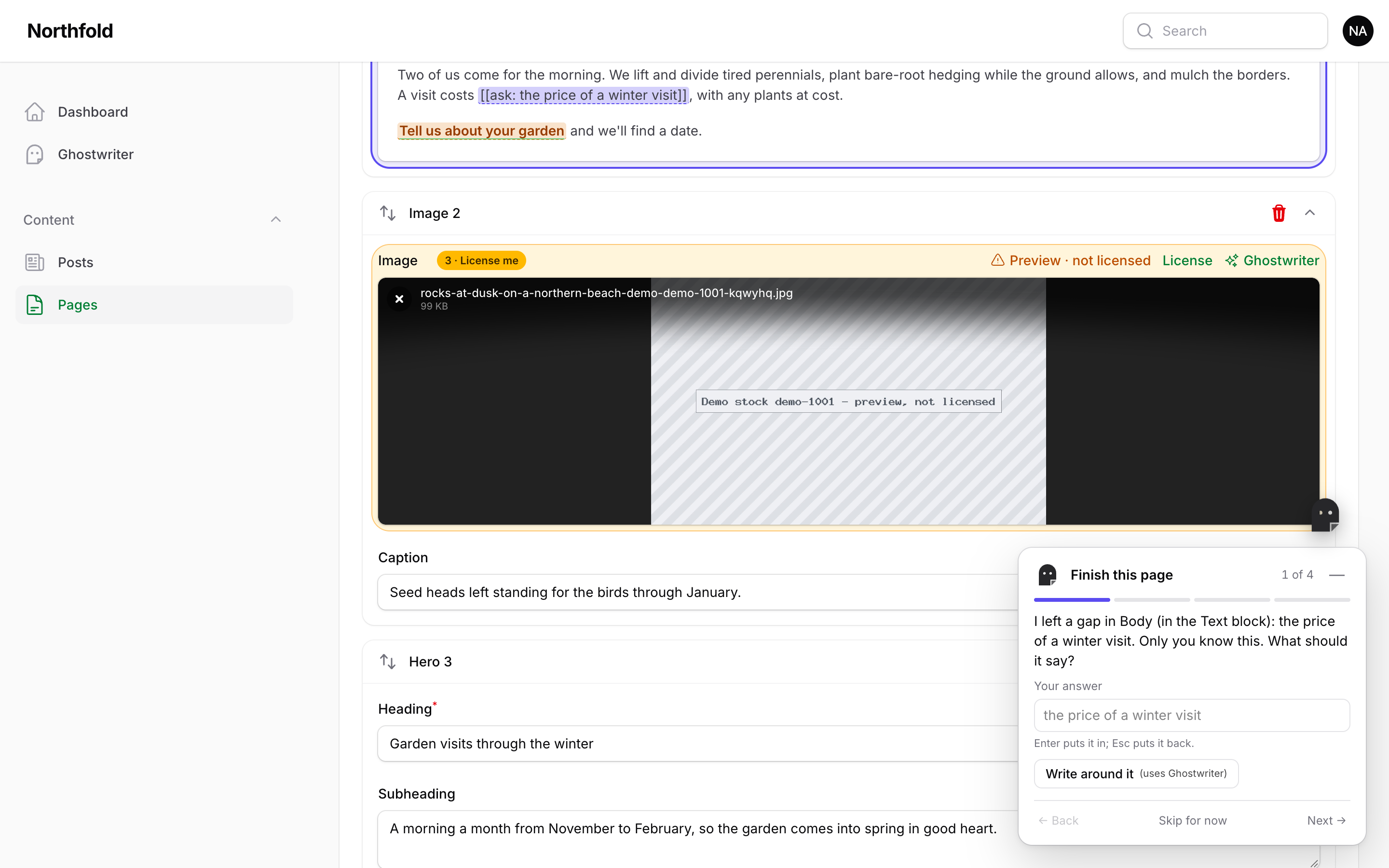
A field holding a preview shows Preview · not licensed beside its Ghostwriter link (the library and photo ID are in its tooltip), with License. Click the badge to see the comp: it's served only inside the panel, to people who can use Ghostwriter, and never cached or indexed. The image panel shows it too, when you open it on that field.
People who may not license see Ask a manager to license and Request licence. A request puts the image at the top of Stock images for a manager.
The badge also reads Preview expired once the comp's time is up (below), Licence being checked while an unknown outcome is settled, Licence failed, or Licensed · file not replaced.
License & replace
License opens the confirm step:
- the licence option, as a choice when the account has several;
- the cost, such as "Uses 1 of your 100 remaining downloads (Demo pack)". When it can't be known beforehand, it says so;
- editorial restrictions, if any;
- the credit line that will be stored, with: "If this page is news, a blog post or other editorial use, show this credit next to the image";
- seat notices where a licence limits who may use the file (an iStock standard licence, Getty Premium Access);
- a tick box for an editorial image;
- License & replace.
After it: "Licensed. The preview has been replaced with the full image." The licensed file is written over the stand-in, at the same path, byte for byte (its embedded copyright and IDs must stay), so the record that holds the path, and its alt text, don't change. The comp is deleted. If your app serves files through a CDN, it may show the stand-in until its cache expires; a short cache time for the upload folder helps.
When it doesn't work, it says why, in plain words:
| What happened | What it says |
|---|---|
| Nothing left on the account | "Your … account has nothing left to license this with. Nothing was bought." |
| The price changed | "The price has changed since you confirmed it. Check it and try again." (with the options as they are now) |
| Not connected | "… isn't connected. Check its keys in Settings, then try again. Nothing was bought." |
| No answer after the purchase was sent | "We couldn't confirm the purchase. Ghostwriter will check with … in a few minutes; don't buy it again." |
An unknown outcome is never bought again: the cleanup (below) asks the library which licences it has, and settles it. If the file can't go in place, the licence is kept and Download again and replace finishes it.
Apps with media tables of their own can listen for StockImageLicensed (the record, disk and path) to store the credit line.
Publishing
A page shouldn't go live with a preview in it. Filament has no "published" of its own, so tell Ghostwriter what live means:
GhostwriterPlugin::make()
    ->publishedWhen(fn (Model $record): bool => $record->status === 'published')
The record is given with the form's values laid over it, before it's saved. With it:
- Saving a record that will be published with an unlicensed preview is refused, with the message under the image field: "Cover is a Demo stock preview, not licensed yet. License it, or choose another image, before publishing."
- Drafts save freely: previewing in place is what drafts are for.
- Set When a page with an unlicensed preview is published to Warn in Settings (or
GHOSTWRITER_STOCK_ON_PUBLISH=warn, which wins) to save it with a warning instead.
Without ->publishedWhen(), nothing is refused, and every save with a preview in it shows a warning that stays until closed.
New records start unpublished
A draft from Ghostwriter often sets a record's status from the records it learned from, so a new record can come out "published" with a preview in it, and its first save would be refused. Say how a record is unpublished, and Use this draft on a Create page sets it in the form:
GhostwriterPlugin::make()
    ->publishedWhen(fn (Model $record): bool => $record->status === 'published')
    ->unpublishWith('status', 'draft')               // or ->unpublishWith('is_published', false)
For more than one field, give a closure that gets the form's data and returns it changed: ->unpublishWith(fn (array $data): array => [...$data, 'status' => 'draft', 'published_at' => null]).
It's in the form, so people see it and can change it before saving. The notes after the draft say: "Ghostwriter drafts start unpublished. Switch it on when you're ready." It applies on Create pages only, never to an existing record, and with or without stock photos.
If your app has a preview of its own, show the comp there to signed-in people with:
Ghostwriter::stockPreviewUrl('public', $post->cover) // the comp's address, or null: show the file itself then
It's null for anyone who can't use Ghostwriter, and once the photo is licensed. Never use it for shared or signed-out previews.
Who may license
Licensing spends money, so it has its own rule:
GhostwriterPlugin::make()
    ->canLicense(fn (User $user): bool => $user->is_admin)
Without it, whoever may manage Ghostwriter may license. Connecting a library's account is for managers. A licenseGhostwriterStock gate of your own wins. Inserting a preview needs only Ghostwriter itself.
Stock images
Ghostwriter → Stock images lists every stock photo Ghostwriter put into a record, free or paid. The tabs are Previews (licence requests first), Licensed, Failed and All. Each row shows:
- the picture;
- the library and ID;
- where it's used, with links (and whether that record is live);
- its state;
- its cost;
- who licensed it, when, and the order ID;
- its credit line and restrictions.
Actions: License, Request licence, Reconcile (for an unknown outcome), Remove preview (the comp goes; the record is kept as removed), and Download licence record. Export CSV gives the tab's records for finance and audits.
Licence records are never deleted. Rolling the migration back keeps the tables, unless GHOSTWRITER_DROP_STOCK_LEDGER=true.
Where an image is used is kept up to date as records are saved. Ghostwriter looks for the ledger's files in each saved record of the resources it writes for, Builder blocks and JSON columns included.
The Overview shows "N to license" on a Stock previews tile while there are previews, as a warning once one is on a live record. The widget shows a line too.
Cleanup
php artisan ghostwriter:stock-cleanup runs daily on Laravel's scheduler (make sure schedule:run runs). In every tenant, it:
- deletes comps whose time is up (30 days from download for the demo, Getty and iStock), used or not. The stand-in stays, and the badge says Preview expired. Refresh preview fetches the comp again, on a click, once per preview;
- removes previews used nowhere for 30 days (
ghostwriter.stock.unused_days), stand-in and all; - reconciles licences whose outcome wasn't known, without buying again.
AI and stock images
No Getty or iStock image the app holds goes to a model: not as a reference for ranking photos or making pictures, not as a sample for the image style guide. Ghostwriter checks the ledger, the file's name (GettyImages-…, iStock-…) and its embedded credit. If your app has other AI features, keep them away from these images too.