
Permissions
This page covers who can use Ghostwriter, who manages it, how conversations are shared, and how Ghostwriter works with tenancy and several panels.
Ghostwriter checks two gate abilities:
| Ability | Allows | Default |
|---|---|---|
useGhostwriter |
Ghostwriter's pages, the writing panel, the image button, the widget | Anyone who can use the panel (canAccessPanel()) |
manageGhostwriter |
The settings page; hiding and showing Get started; deleting a piece someone else started | The plugin's ->canManage() rule if set; otherwise anyone with useGhostwriter, except on panels with tenancy, where nobody |
Using Ghostwriter
Everyone with useGhostwriter can write and edit with Ghostwriter. They also share the voice guide, image style guide, kinds of content and content plan, and can change them: edit or rewrite a guide, edit or delete a kind, add, dismiss or delete ideas. These are the writing team's shared tools, like the records themselves. If only some people should change them, limit useGhostwriter itself:
// In a service provider's boot()
Gate::define('useGhostwriter', fn (User $user) => $user->is_editor);
Ghostwriter only defines its default when your app hasn't defined the gate.
Writing into a record still needs the resource's own permission:
- Write with Ghostwriter is on Create pages, which Filament only shows to people the resource's policy lets create records.
- Edit with Ghostwriter shows only when the resource's
canEdit()allows it for that record.
Managing Ghostwriter
People who manage Ghostwriter can:
- change the settings
- hide and show Get started
- delete anyone's piece (see Deleting a piece)
Filament has no roles of its own, so say who manages Ghostwriter with one line on the plugin:
GhostwriterPlugin::make()
    ->resources([...])
    ->canManage(fn (User $user): bool => $user->is_admin)
The rule is asked only of people who also have useGhostwriter. It's set per panel, so a panel without it keeps the default. It works on panels with tenancy too, and it's the simplest way to let someone change the settings there.
Without ->canManage(), everyone who can use Ghostwriter manages it, except on panels with tenancy. Settings are for the whole app, so there one tenant's user could change them for every tenant. That's why nobody manages Ghostwriter on a panel with tenancy until you say who.
Who manages Ghostwriter is decided by the first of these that applies:
-
A
manageGhostwritergate defined by your app (and, as always, anyGate::before()callback):Gate::define('manageGhostwriter', fn (User $user) => $user->is_admin); -
The plugin's
->canManage()rule, on the current panel. -
The default: anyone with
useGhostwriter, except on panels with tenancy.
Shared conversations
Every conversation is shared with everyone who may use Ghostwriter, within the current tenant on a panel with tenancy. Everyone's pieces show in:
- Or carry on with, in the writing panel
- Carry on, on the Overview, and the widget
- Resume, on the content plan
- Edit with Ghostwriter, on a record
So a colleague can pick a piece up where you left it.
Each message shows who sent it: "You", or the person's name. The panel shows "Started by … · last changed by …".
Ghostwriter answers one request at a time. While someone's request runs, others see "Maya is waiting on Ghostwriter". They can't send a message or change the draft until it has answered.
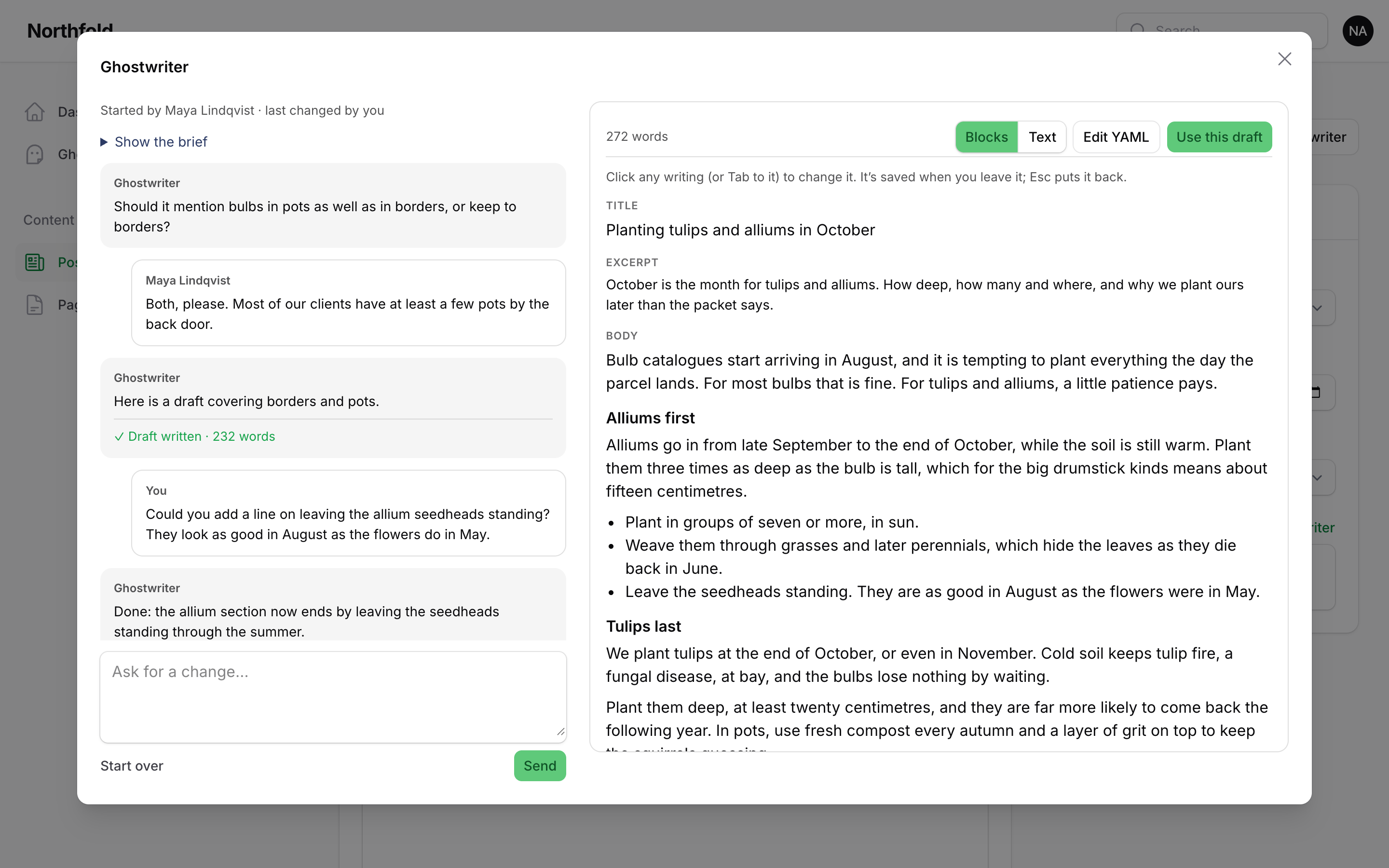
To keep each piece to the person who started it, turn sharing off in .env:
GHOSTWRITER_SHARED_CONVERSATIONS=false
This is shared_conversations in config/ghostwriter.php. With it off, nobody else sees or opens a piece.
Deleting a piece
With sharing on, only the person who started a piece, or someone who manages Ghostwriter, can delete it with Remove. Others don't see the button, but they can still carry the piece on.
Tenancy
On a panel with tenancy, each tenant gets its own:
- voice guide and image style guide
- kinds of content
- content plan
- pieces in progress
- form maps and working state
One tenant's voice never reaches another's. Ghostwriter only reads the current tenant's records. The resource's query is scoped to the tenant in requests, and in queued jobs, which carry the tenant they were started from.
Settings are shared by the whole app, across tenants.
Nothing needs setting up. Ghostwriter's tables carry tenant_type and tenant_id columns, which are empty on panels without tenancy.
Several panels
Register the plugin on each panel that should have it. Each panel has its own:
- resources
- navigation settings
- image button and widget settings
->canManage()rule
Panels without tenancy share one set of guides, kinds and plan.