
Installation
On this page
This page covers buying a licence, installing Ghostwriter in a Laravel app with a Filament panel, registering it on the panel, and running the queue it needs.
Requirements
- A Ghostwriter for Filament licence (see Buy a licence)
- PHP 8.3 or later
- Laravel 12 or 13
- Filament 5.8 or later (with Livewire 4)
- An API key for Anthropic (Claude), OpenAI (ChatGPT) or Google (Gemini). See API keys.
- A queue worker, for model calls (see The queue)
- Optional: an OpenAI or Gemini key, to make images
- Optional: the GD PHP extension, for image placeholders. Without it, image fields a draft leaves empty are left empty.
- Optional: the Imagick PHP extension, to send the model smaller copies of large images. Without it, large images are skipped.
Buy a licence
Ghostwriter for Filament is a paid plugin, sold through Anystack. Buy a licence to get a licence key. You need the key and the email address you bought with to install the plugin.
Add the repository
Composer installs Ghostwriter from its private Composer repository on Anystack. Add the repository to your app:
composer config repositories.ghostwriter-filament composer https://ghostwriter-filament.composer.sh
Or add it to composer.json by hand:
"repositories": {
    "ghostwriter-filament": {
        "type": "composer",
        "url": "https://ghostwriter-filament.composer.sh"
    }
}
Sign in to the repository
The repository asks for a username and password. The username is your email address and the password is your licence key:
composer config http-basic.ghostwriter-filament.composer.sh [email protected] YOUR-LICENCE-KEY
If your licence needs a fingerprint, add it to the key after a colon: YOUR-LICENCE-KEY:your-fingerprint. Otherwise use the key on its own. If your licence isn't assigned to a person, use unlock as the username instead of your email address.
This saves the details in auth.json beside composer.json. Keep auth.json out of version control:
echo auth.json >> .gitignore
On a CI server or when deploying, give Composer the details in the COMPOSER_AUTH environment variable instead, from your CI's secrets:
COMPOSER_AUTH='{"http-basic":{"ghostwriter-filament.composer.sh":{"username":"[email protected]","password":"YOUR-LICENCE-KEY"}}}'
Install the plugin
composer require 1994/ghostwriter-filament
php artisan ghostwriter:install
Composer installs 1994/ghostwriter-core (^1.10), the public package Ghostwriter shares with its Statamic and Craft versions, with it. You don't need to add a repository for that.
Ghostwriter talks to Anthropic, OpenAI and Gemini itself, through 1994/ghostwriter-core. It doesn't use the Laravel AI SDK (laravel/ai). If you installed that only for Ghostwriter, you can remove it. Ghostwriter still reads a key from config/ai.php if its own variable is empty (see API keys), so move the key to .env before you delete that file.
ghostwriter:install publishes config/ghostwriter.php and Ghostwriter's migrations, then asks to run the migrations. Pass --no-migrate to run them yourself later, or --force to overwrite files you published before.
Ghostwriter's stylesheet and scripts are Filament assets. If your deploy doesn't already do it, publish assets after installing or updating:
php artisan filament:assets
Register the plugin on a panel
In the panel's provider, add the plugin with the resources it writes for:
use NineteenNinetyFour\Ghostwriter\Filament\GhostwriterPlugin;

public function panel(Panel $panel): Panel
{
    return $panel
        // ...
        ->plugin(
            GhostwriterPlugin::make()
                ->resources([
                    PostResource::class => fn ($query) => $query->where('status', 'published'),
                    PageResource::class,
                    CaseStudyResource::class,
                ])
                ->canManage(fn (User $user): bool => $user->is_admin)
        );
}
Resources. Ghostwriter only reads and writes for the resources you list. A closure narrows a resource to the records that count as published. Ghostwriter learns from those records. Without a closure every record counts, so add one when a resource holds drafts.
Who manages Ghostwriter. ->canManage() says who may change the settings, hide Get started and delete a piece someone else started. Filament has no roles of its own, so without it everyone who can use Ghostwriter manages it, except on panels with tenancy, where nobody does. See Permissions.
Links to your pages. Drafts link to your other records only when Ghostwriter knows their public address. Add ->publicUrlUsing() for each resource whose records are public pages (it's optional; without it drafts get no links):
GhostwriterPlugin::make()
    ->resources([...])
    ->publicUrlUsing(PostResource::class, fn (Post $post) => $post->status === 'published' ? route('posts.show', $post) : null)
See Links to your pages.
The other plugin options (navigation, the image button, the widget) are listed in Configuration.
Add Ghostwriter to your resource pages
Add the WritesWithGhostwriter trait to each resource's Create and Edit pages:
use NineteenNinetyFour\Ghostwriter\Filament\Concerns\WritesWithGhostwriter;

class CreatePost extends CreateRecord
{
    use WritesWithGhostwriter;
}

class EditPost extends EditRecord
{
    use WritesWithGhostwriter;
}
The trait does four things:
- It adds Write with Ghostwriter to the Create page and Edit with Ghostwriter to the Edit page, with a menu beside it (see The Ghostwriter button).
- It puts drafts and images into the form.
- It reopens the panel after a reload.
- On the Create page, it links the new record to the piece whose draft went into it. Editing the record later carries on that conversation. This happens in
afterCreateWritesWithGhostwriter(), which Filament calls after your ownafterCreate(), so a page can still have its ownafterCreate().
If a page already defines getHeaderActions(), add GhostwriterMenu::make() to your own list. It is Ghostwriter's button and its menu, as one split button:
use NineteenNinetyFour\Ghostwriter\Filament\Actions\GhostwriterMenu;

protected function getHeaderActions(): array
{
    return [
        GhostwriterMenu::make(),
        DeleteAction::make(),
    ];
}
GhostwriterMenu::make() is for Create and Edit pages. On those, it replaces the GhostwriterAction::make() that 1.1 asked you to add. GhostwriterAction::make() is still the one for list pages.
The Ghostwriter button
On a Create or Edit page, Ghostwriter adds one split button to the page header, with the Ghostwriter mark: Write with Ghostwriter (or Edit with Ghostwriter) and, beside it, a chevron that opens its menu.
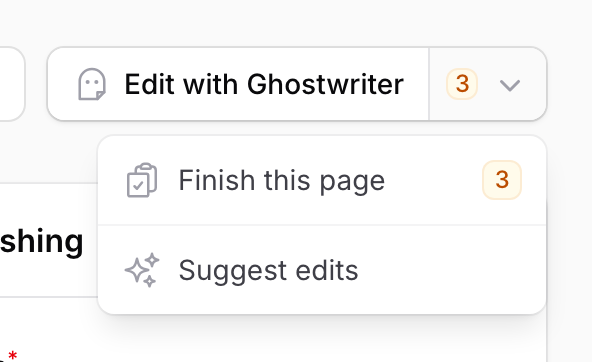
- The count on the chevron is what's left to finish plus the suggestions to review. It's amber while anything is left to finish, grey when there are only suggestions, and gone at 0. Screen readers hear both ("10 items: 3 to finish, 7 suggestions").
- Finish this page, with its count, opens the guide on what's left. It's listed only while there's something to finish.
- Review suggestions, with its count, opens the guide on the suggestions. It's listed only while there are some.
- Suggest edits starts a review of the record. It's on Edit pages only.
With nothing in the menu, the chevron goes. On a phone, the button shows the mark alone.
To start from the list page too, add the ListsWithGhostwriter trait. It puts Write with Ghostwriter beside New. Or add GhostwriterAction::make() to the list page's own header actions. Either one opens the Create page with the panel open.
use NineteenNinetyFour\Ghostwriter\Filament\Concerns\ListsWithGhostwriter;

class ListPosts extends ListRecords
{
    use ListsWithGhostwriter;
}
Add your API key
Set up one writing key under Ghostwriter → Connections (paste it, Check & save), or add it to .env, such as ANTHROPIC_API_KEY=sk-ant-..., which always wins. Connections keeps keys in the ghostwriter_credentials table: its migration comes with the others (ghostwriter-migrations), or on its own with ghostwriter-connections-migrations. API keys covers every service, including the free options; Connections how keys are kept.
Who can use it
Anyone who can use the panel can use Ghostwriter, unless you define the useGhostwriter gate. See Permissions.
The queue
Every model call runs as a queued job, and the page checks back for the result. A call takes from a few seconds to a few minutes.
Send Ghostwriter's jobs to a queue of their own with GHOSTWRITER_QUEUE, and run a worker for it:
GHOSTWRITER_QUEUE=ghostwriter
php artisan queue:work --queue=ghostwriter,default --timeout=960
Why 960 seconds. A call that finds the provider busy is tried again, up to 3 attempts in all (see Busy providers and retries). So each job is allowed its time limit × 3 + 60 seconds. With the default time limit of 300 seconds, that's 960. If you raise the time limit, raise --timeout with it.
Keep the queue connection's retry_after above that too: in config/queue.php, or DB_QUEUE_RETRY_AFTER for the database driver. Otherwise a slow job can be started a second time.
If nothing has picked a job up after 30 seconds, the page says "Still waiting for a queue worker to pick this up. Is php artisan queue:work … running?", with the queue it is waiting on.
With the sync driver, jobs run after the response has been sent, so the page doesn't wait. This is fine for local work, but a long draft holds a PHP process until it's done.
The scheduler
Content to revisit and the link index are kept current by ghostwriter:revisit, daily, and stock photo previews are tidied by ghostwriter:stock-cleanup. Ghostwriter adds both to Laravel's scheduler itself; you only need the scheduler running, as usual:
* * * * * cd /path-to-your-app && php artisan schedule:run >> /dev/null 2>&1
Or php artisan schedule:work while developing.
Navigation
Ghostwriter adds one Ghostwriter item to the panel's navigation, with the Ghostwriter logo. Its pages are tabs across the top:
- Get started (until it's done or hidden)
- Overview
- Content plan
- Content to revisit
- Voice guide
- Image style
- Stock images
- Settings (only for people who manage Ghostwriter)
On a narrow screen the tabs become a menu.

Change this on the plugin:
use Filament\Pages\Enums\SubNavigationPosition;

GhostwriterPlugin::make()
    ->navigationGroup('Content')                             // put the Ghostwriter item in one of your groups
    ->navigationSort(30)                                     // and place it among the items there
    ->subNavigationPosition(SubNavigationPosition::Start)    // list the pages down the side instead of across the top
To list each page in the navigation as its own item, use ->navigation(cluster: false). The pages then go in a group called "Ghostwriter", unless you name another with navigationGroup() (or pass null for no group). The pages' addresses (/admin/ghostwriter/...) are the same either way.
The logo is a Blade icon set you can use too: ghostwriter-mark (outline) and ghostwriter-mark-solid, drawn on a 24 viewBox like the heroicons. It's on the navigation item, the Ghostwriter button, the image button and the widget.
Updating
composer update 1994/ghostwriter-filament
php artisan filament:assets
php artisan ghostwriter:scan
Read the changelog before updating. Ghostwriter's migrations are published into your app, so a release that adds tables or columns says which tag to publish before you run php artisan migrate.
Updates come from the same Anystack repository, with the details you signed in with.
Upgrading from 1.1
composer update 1994/ghostwriter-filament 1994/ghostwriter-core
php artisan vendor:publish --tag=ghostwriter-suggest-migrations
php artisan vendor:publish --tag=ghostwriter-link-index-migrations
php artisan vendor:publish --tag=ghostwriter-seo-migrations
php artisan vendor:publish --tag=ghostwriter-connections-migrations
php artisan migrate
php artisan filament:assets
php artisan ghostwriter:scan
php artisan ghostwriter:revisit --full
php artisan queue:restart
The sections below say what each step does, and the changes to make to your own pages. Keys in .env keep working and win; the OpenRouter key and connected accounts move into Connections when the migration runs. They're encrypted with APP_KEY, so keep it the same between deploys.
Connections
This release adds Ghostwriter → Connections, where every key can be set up in the panel, kept encrypted in a new table.
-
Publish its migration, then run it:
php artisan vendor:publish --tag=ghostwriter-connections-migrations
php artisan migrate
The migration also moves Connect with OpenRouter's key and connected accounts' tokens out of
ghostwriter_statesinto the new table. Until it runs, nothing set up in Connections is kept, and the page says what to run. -
Publish the assets (
php artisan filament:assets): the stylesheet has the Connections cards. -
Keys in
.envkeep working, and win; nothing else changes.
Suggest edits, Content to revisit and links
This release adds Suggest edits, Content to revisit, the link index and internal links. It needs 1994/ghostwriter-core 1.9 or later, which Composer installs with it.
-
Publish the new migrations, then run them. There are three, each with its own tag:
php artisan vendor:publish --tag=ghostwriter-suggest-migrations # Suggest edits and Content to revisit php artisan vendor:publish --tag=ghostwriter-link-index-migrations # the link index php artisan vendor:publish --tag=ghostwriter-seo-migrations # internal links on a piece php artisan migrate -
Publish the assets (
php artisan filament:assets). Internal links bring a new script. -
Read the forms again (
php artisan ghostwriter:scan), so headings follow each RichEditor's toolbar and SEO fields are found. -
Update your own header actions. On a Create or Edit page that defines
getHeaderActions(), replaceGhostwriterAction::make()withGhostwriterMenu::make(). Without it, the page has no menu, no count and no Suggest edits. See Add Ghostwriter to your resource pages. -
Say where your records are public, if you'd like drafts to link to them:
->publicUrlUsing()on the plugin. See Links to your pages. -
Fill the list and the index once:
php artisan ghostwriter:revisit --full. After that the scheduler keeps them current.
Optional, on your forms:
->ghostwriterSeo('title'),->ghostwriterSeo('description', fallback: 'excerpt')or->ghostwriterSeo('noindex')for SEO fields not namedseo_title,meta_description,noindexand the like. See SEO fields.->ghostwriterSlug()on aTextInputthat holds the record's address but isn't calledslug. See The address (slug).->ghostwriterHeadings(from: 1)on a RichEditor or MarkdownEditor whose#is the page's main heading. See Headings.
When your licence expires
What happens depends on how your licence is set up. Either Composer can still install the releases that came out before it expired, and you renew to get later ones, or the repository stops letting you in until you renew. Your Anystack account shows your licence and when it expires.
Uninstalling
-
Remove the plugin from your panel providers.
-
Remove the traits,
GhostwriterMenuandGhostwriterActionfrom your pages. -
Roll back or drop the
ghostwriter_tables. -
Run:
composer remove 1994/ghostwriter-filament