
Finish this page
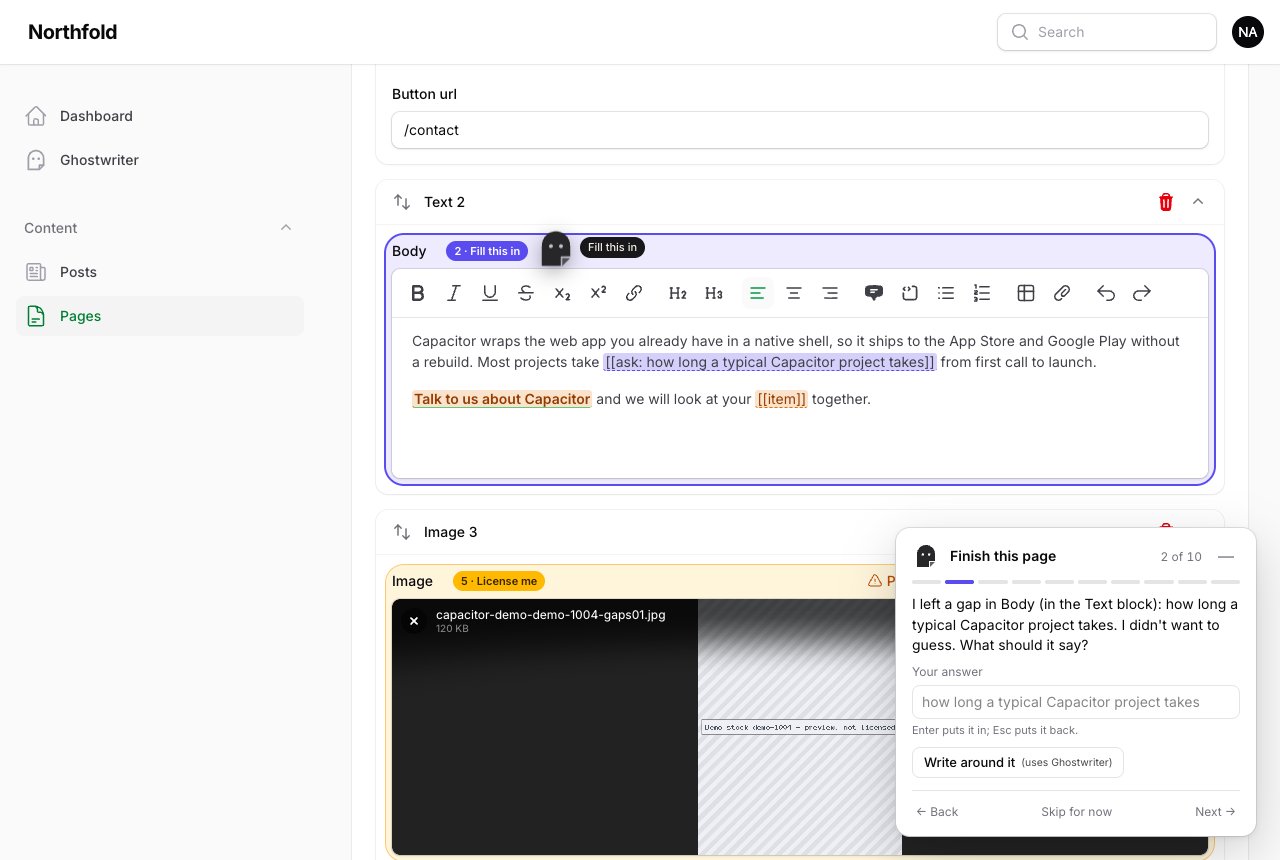
A draft can't know everything. Ghostwriter never invents a price, a date, a duration or a name. It leaves a mark where only you know the answer. Finish this page finds everything still unfinished on a record, highlights it in the form, and takes you through it one field at a time. A record can't be published until the gaps that matter are finished.
It works on any record of a resource Ghostwriter writes for, whoever wrote it. Finding gaps never asks a model and costs nothing.
What it finds
| Gap | What it is | Counts | Blocks publishing |
|---|---|---|---|
| A fact to add | [[ask: adult ticket price]] in any text: a fact the writer didn't have and wouldn't guess |
✓ | ✓ |
| A fact for a number or date field | The writer wanted to ask for it, and the field is still empty | ✓ | ✓ |
| A link to choose | A link to #gw-link:contact-page in a RichEditor or Markdown field: the words are there, the address isn't |
✓ | ✓ |
| Leftover template text | [[item]] and the like, from a prompt override with a typo |
✓ | ✓ |
| An image placeholder | Ghostwriter's striped placeholder, in an upload field or inline in a RichEditor | ✓ | ✓ |
| A stock preview | A paid stock photo put in as a preview but not licensed (Stock photos) | ✓ | ✓ |
| An empty image field | Required, or filled on at least half the records like this one | ✓ | |
| An empty required field | Filament stops the save itself | ✓ | |
| A usually-filled field | Empty prose that most records like this fill in (a summary) | suggestion | |
| Placeholder-looking text | TBC, TBD, [insert …], lorem ipsum |
suggestion |
"Counts" is what the pill counts. Suggestions are listed after the steps, numbered on their own, and never block anything.
The markers are visible on purpose: someone who never opens the guide still sees [[ask: …]] in the text. The keywords ask and gw-link are never translated.
The guide
- The pill, beside Write with Ghostwriter in the page header, says how many things are left ("5 things to finish"), then "Ready to publish". On a new or finished record with nothing that blocks publishing, it doesn't appear.
- Highlighted fields: amber for what's left, the guide's colour for the current step, and green once finished in this view. A tag beside the field's name says which step it is and what kind ("2 · Swap me"), or, for a field with several, the range ("2–4 · 3 to do"). Click a tag to go to that step.
- Inside a RichEditor, the marker's own words get a dashed underline: the fact to add, the link's words, the template token.
- The guide, bottom right, has the message, the fixes, and Back · Skip for now · Next. It opens the field's tab, section, or collapsed Builder or Repeater item, and scrolls it into view clear of the guide.
- The flying mark goes to each field with a short label ("Fill this in", "Needs a link", "Swap me", "License me").
- Minimise (the —, or Esc inside the guide) folds it into the corner dock with a count badge. Whether it was open or minimised is remembered for you, on every record. It starts minimised, and opens by itself after you use a draft (
ghostwriter.finish.open_after_draft).
Moving between steps, minimising and restoring all happen in the browser: they never send the form to the server, so file uploads and editors are left alone. Only a fix that changes a field writes into the form.
Fixes
| Fix | What it does |
|---|---|
| Type it in (a fact) | A box in the guide: Enter, or leaving it, puts your answer in place of the marker; Esc puts it back. |
| Add the address (a link) | Points the link at what you type: /contact or a full address. |
| Remove the link | Keeps the words, drops the link. |
| Remove it (template text) | Deletes the token. |
| Find a photo | Opens the field's own Ghostwriter image dialog. |
| Upload an image | Opens the field's own file picker, even when the placeholder fills it. |
| Leave it empty | Takes the placeholder out, where the field isn't required. |
| License / Request licence | Opens the stock badge's own License dialog (its confirm and its cost), or asks a manager. |
| I'll write it | Puts the cursor in the field, with the marker selected so typing replaces it. |
| Write it for me (uses Ghostwriter) | One small request: a line for an empty summary-like field, from the page's own text. |
| Write around it (uses Ghostwriter) | One small request: the sentence rewritten without the missing fact. It never fills the fact in. |
| It's fine | Skips a suggestion for now. |
Nothing is saved until you press Save. Skip for now is remembered for this record until you close the browser tab; a skipped step still counts and still blocks.
Only the two fixes marked uses Ghostwriter call a model, one small request per click. Ghostwriter refuses to write a fact, and an answer with a figure the page doesn't have is thrown away.
Keyboard and screen readers
- Alt+Shift+N next, Alt+Shift+P back, Alt+Shift+G open or minimise. These work anywhere on the page except while typing in a field.
- The guide is a labelled region, not a dialog: the form stays usable. Focus moves to the step's message when it opens or moves on, and to the dock when it's minimised. A polite live region says each step and each fix.
- Tags are buttons ("Gap 2 of 5: Needs a link"), and each highlighted field says what it needs.
- Under reduce motion there is no flight, bobbing, peeking or wisps; minimising is an instant swap.
- Dark mode follows Filament's. Below 640px wide the guide is a bottom sheet, and the flying mark is hidden.
Publishing
Filament has no "published" of its own, so the plugin's ->publishedWhen() says what live is:
GhostwriterPlugin::make()
    ->publishedWhen(fn (Model $record): bool => $record->status === 'published');
- With it, saving a record that will be live while something that blocks is left is refused. Each message is under its own field ("Add the adult ticket price before publishing."), Builder and Repeater items included. Drafts save freely. Required fields are left to Filament's own validation.
- Set to Warn, the record saves, with one warning that lists everything left.
- Without
publishedWhen, nothing is ever refused: each save with something unfinished gets one warning.
The rule is Settings → Publishing → When a page is published with something unfinished: Block (the default) or Warn. GHOSTWRITER_PUBLISH_ON_UNFINISHED=block|warn in .env wins over the page. Until the new setting is saved, the older stock photos setting (and GHOSTWRITER_STOCK_ON_PUBLISH) is still read.
The same guard covers unlicensed stock previews, so a preview and a marker give one refusal with both.
In Warn mode, [[ask: …]] text goes live as it is. That's the price of warning instead of blocking.
What Filament can't do (yet)
- Link fields. Filament forms have no link fields Ghostwriter knows, so link gaps exist only inside RichEditor and Markdown text. A required URL
TextInputshows as an empty required field. There are no "Link to …" suggestions and no broken-link check: there are no entries to link to. - An asset browser. Images come from Find a photo or the field's own upload.
For developers
- The pill and the guide appear on the Create and Edit pages of the resources Ghostwriter writes for (pages using
WritesWithGhostwriter), for people who may use Ghostwriter. - Every field's wrapper gets
data-gw-path="<state path>"(added to its own attributes withField::configureUsing()). Where an app replaces the wrapper attributes, the guide finds the field by its input's ID. - Every RichEditor gets Ghostwriter's
RichContentPlugin, whose TipTap extension draws the underlines with ProseMirror decorations. It doesn't change the content. - Gaps are found in the form as it is, through the stored form map. After changing a resource's form, run
php artisan ghostwriter:scan. - The guide's own state (open or minimised) is saved with a plain
POSTtoghostwriter/finish-guideon the panel. - A draft's gap list is kept on its session (the
gapscolumn, one of the migrationsghostwriter:installpublishes), so the guide can say why something was left.