
Finish this page
Some things in an entry only a person can finish. Ghostwriter finds them, and it won't let the page go live until they're done.
- Facts to add. Ghostwriter never invents a price, a date, a duration, a name or a quote. Where a draft needs one it doesn't have, it marks the place:
Tickets cost [[ask: adult ticket price]] for adults. - Links to choose. A link whose page Ghostwriter doesn't know keeps its words, and points at
#gw-link:with a hint:[Talk to us](#gw-link:contact-page). A Link or Hyper field it can't settle holdshttps://example.com/#gw-link:<hint>with the text "Link to choose". - Images to choose. The striped placeholder in an image field, and a stock photo preview not licensed yet.
It also notices links to entries that have been deleted, template text such as [[item]] left in a sentence, required fields left empty, and placeholder words such as "TBC".
Finding them never calls a model. It works on any entry in a section Ghostwriter writes for, whoever wrote it.
The guide
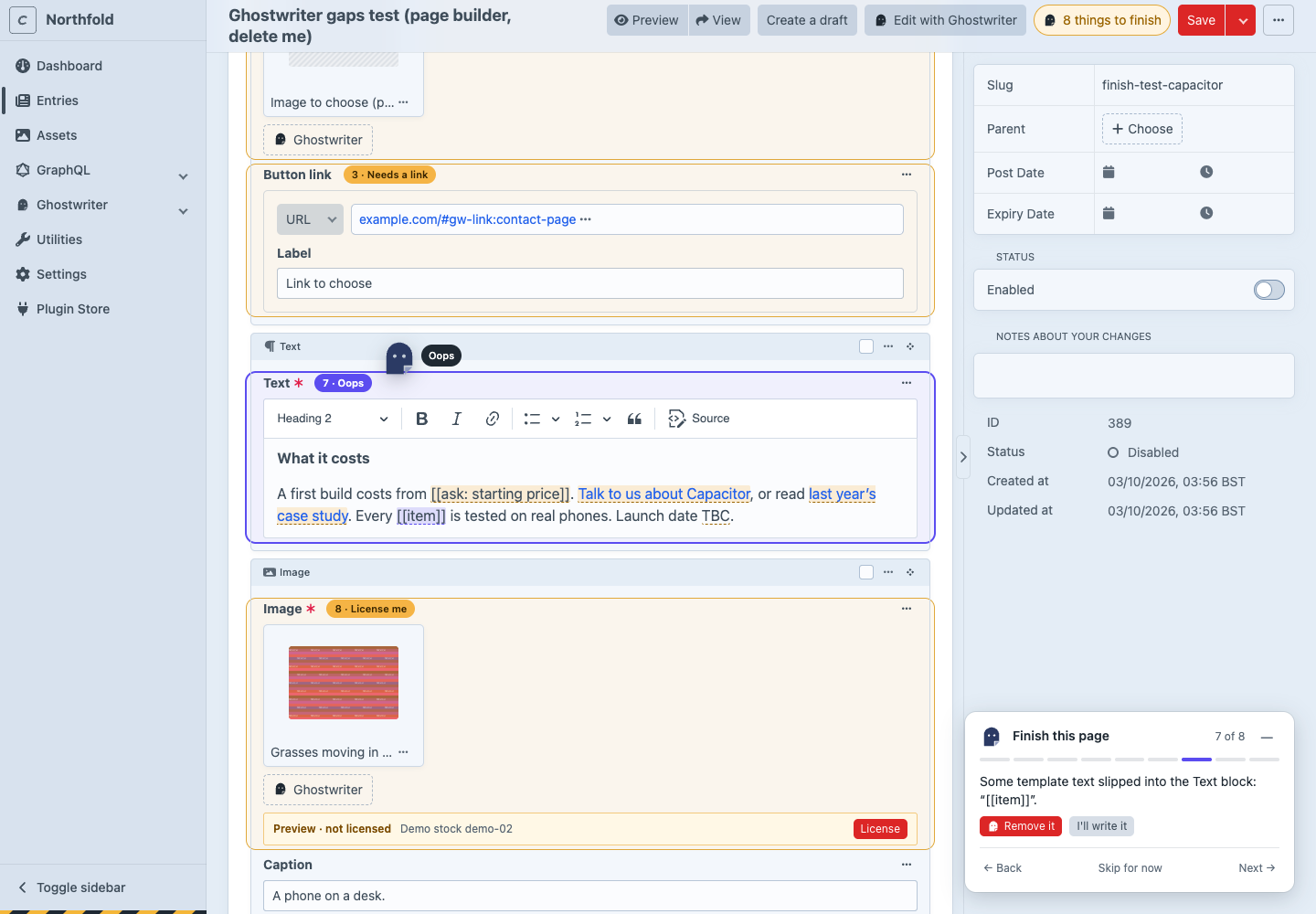
On an entry with something that stops publishing, a count sits beside Save: "8 things to finish". Each field with a gap is outlined, with a numbered tag beside its name ("3 · Needs a link"; "4–7 · 4 to do" for a field with several); inside CKEditor the words themselves are marked. Click the count, or a tag, to open the guide in the corner. It takes you through each one, the things to finish first ("2 of 8") and then any suggestions ("Suggestion 1 of 1"), which never stop the page going live:
-
The step: what's missing, and where, in plain words. "I left a gap in the Text block: starting price. I didn't want to guess. What should it say?"
-
The fixes, the most likely first:
What Fixes A fact to add A box to type it into: Enter, or leaving the box, puts it in the field in place of the marker; Esc leaves it. Write around it rewrites the sentence without the fact. Ghostwriter never suggests the fact itself. A link to choose Link to Contact where an entry's title or slug matches the hint, Choose an entry (Craft's own picker), or Remove the link (the words stay) An image placeholder Find a photo (Ghostwriter's image dialog for that field), Choose from Assets (the field's own picker, replacing the placeholder), or Leave it empty when the field isn't required A stock photo preview License, through the stock photos' own License & replace dialog, which shows what it costs; Request licence without the permission; Choose another A required field Write it for me (a line from the page's own text) for writing fields, or I'll write it Template text, "TBC" Remove it, I'll write it, or It's fine for a suggestion Write it for me and Write around it each make one small request to your AI provider, and say so on the button ("uses Ghostwriter"). Nothing else in the guide calls a model.
-
Back, Skip for now and Next. Skipped gaps stay highlighted and still count; the guide remembers them for this entry for the rest of the browser session.
Every fix goes into the form, as if you had typed it. Craft saves your draft as it always does, and nothing is published until you save.
The guide looks again each time Craft saves your draft, and only what it finds then is still a step. A field turns green ("Fixed ✓") once it had gaps and has none left; when a fix leaves something else in the same field (a placeholder swapped for a stock preview, which still needs a licence), that's a new step and the field stays open.
The Ghostwriter mark flies to each field, just past its tag, with a short label ("Fill this in", "Needs a link", "Swap me", "License me"). Minimise the guide with — (or Esc inside it) and it folds into the mark in the corner, with the count; click it to bring the guide back. Each person's choice, open or minimised, is remembered on every entry. After Use this draft, the guide opens by itself (Open the guide after a draft is added).
A block in a page builder that's collapsed is expanded when its step comes up, and the right tab is opened. In a Matrix field shown as cards, the card carries the highlight, and Open block opens it in Craft's slideout, where its fields are highlighted too.
Keyboard and screen readers
| Keys | |
|---|---|
| Alt+Shift+N / Alt+Shift+P | The next step, the one before |
| Alt+Shift+G | Open or minimise the guide |
| Esc, inside the guide | Minimise it |
The shortcuts work whenever you aren't typing in a field. The guide is a labelled region, not a dialog, so the form stays usable around it; each step, fix and change is announced politely. Tags are buttons ("Gap 4 of 9: Fill this in").
Phones and motion
Below 640px wide, the guide is a sheet along the bottom of the screen, which folds to a single line ("4 of 9 · Fill this in · Next"); the flying mark is left out. With your system set to reduce motion, nothing flies, bobs or folds: the guide and the mark simply appear.
What counts
| What | How it's found | Stops publishing |
|---|---|---|
| A fact to add | [[ask: …]] in any text |
Yes |
| A fact for a number or date field | The draft asked for it, and the field is still empty | Yes, if the field is required |
| A link to choose | A link to #gw-link:…, or a Link or Hyper field holding https://example.com/#gw-link:… |
Yes |
| A link to a deleted entry | Its {entry:…} reference points at nothing |
Yes |
| An image placeholder | The striped ghostwriter-image-placeholder.png in an image field, or inline in CKEditor |
Yes |
| A stock photo preview | The stock ledger says it isn't licensed. See Stock photos | Yes |
| Template text | [[item]], a word in double brackets with no colon |
Yes |
| A required field left empty | Craft's own Required | Craft stops it |
| A field pages like this usually fill | Filled on at least half the section's live entries | No, a suggestion |
| Placeholder words | TBC, TBD, TBA, TODO, XXX, [insert …], [add …], [check …], lorem ipsum |
No, a suggestion |
In sections Ghostwriter doesn't write for, only stock photo previews are looked for.
Publishing
While anything that stops publishing is left, saving the live entry is refused, with a message on each field:
Add adult ticket price before publishing.
Inside a Matrix or Neo block, the message names the block and field: "Hero: Intro: Add adult ticket price before publishing."
- Applying a draft to a live entry is checked the same way.
- Drafts always save, provisional drafts included, and so does a disabled entry. New entries Ghostwriter writes start disabled (see Use this draft).
- Ghostwriter never takes a marker out for you. Removing
[[ask: …]]from "Tickets cost [[ask: adult ticket price]] for adults." would leave "Tickets cost for adults."
To publish anyway and be told what's left, set Settings → Ghostwriter → Finish this page → When a page with things to finish is published to Warn (onUnfinishedPublish = warn). The entry saves with one notice listing everything. Anything still marked goes live as it is: a [[ask: …]] shows as written, and a #gw-link: link goes nowhere.
The older stockOnPublish setting is still read when onUnfinishedPublish isn't set.
Settings
| Setting | Config | |
|---|---|---|
| When a page with things to finish is published | onUnfinishedPublish |
block (the default) or warn. |
| Open the guide after a draft is added | finishOpenAfterDraft |
On. |