
Configuration
This page covers Ghostwriter's settings, setting them in config/ghostwriter.php, where Ghostwriter keeps its work, overriding its prompts, and what it logs.
Settings
Settings → Plugins → Ghostwriter, for admins on an environment where admin changes are allowed. Ghostwriter's own menu links there as Settings.
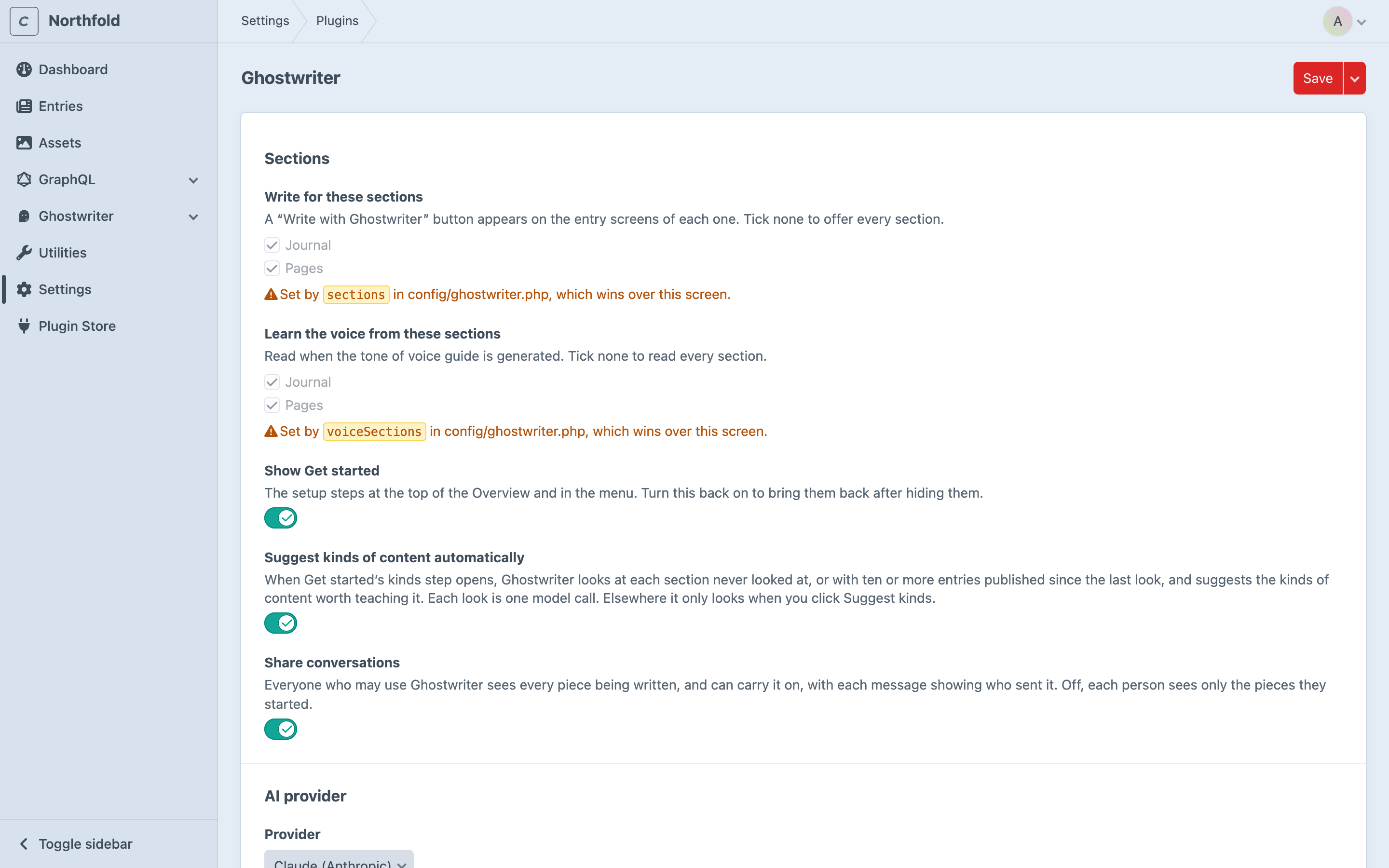
Sections
| Setting | What it does |
|---|---|
| Write for these sections | Sections that get Write with Ghostwriter. None ticked means all. |
| Learn the voice from these sections | Sections read for the voice guide. None ticked means all. |
| Show Get started | The setup steps at the top of the Overview and in the menu. Turn it back on to bring them back after hiding them. |
| Suggest kinds of content automatically | Look at each section for kinds when Get started's kinds step opens. Nowhere else looks without a click. Each look is one model call. |
| Share conversations | On (the default), everyone with Use Ghostwriter sees and can carry on every piece. Off, each person sees only the pieces they started. See Shared conversations. |
AI provider
| Setting | What it does |
|---|---|
| Provider | Claude (Anthropic), ChatGPT (OpenAI) or Gemini (Google), for writing. |
| Model | Leave blank for the provider's default, shown as the placeholder. A model name that doesn't look like the chosen provider's (a gpt-… model with Claude, say) gets a warning; it is still saved. |
| Claude (Anthropic) base URL, ChatGPT (OpenAI) base URL, Gemini (Google) base URL | Under Gateways and proxies: a gateway to call instead of the provider. Leave blank for the provider itself. See Gateways and proxies. |
Images
| Setting | What it does |
|---|---|
| Image provider | ChatGPT (OpenAI) or Gemini (Google), for making images. Whichever has a key uses OpenAI if its key is set, then Gemini. |
| Image model | Leave blank for the provider's default. |
| Mark images still to choose | Striped placeholders in empty image fields on new entries. See Placeholders. |
| Search Openverse | Free public-domain and CC0 photos, with no key. |
Troubleshooting
| Setting | What it does |
|---|---|
| Log replies that can't be read | Off by default. On, a model reply Ghostwriter can't read goes into the log in full. See Logging. Can be an environment variable. |
API keys lists each key Ghostwriter can use as Set or Not set, never the key itself. Keys aren't settings: see API keys.
Settings fixed in config
A setting in config/ghostwriter.php wins over the settings page. Its field is shown locked, with a note: "Set by sections in config/ghostwriter.php, which wins over this screen." Change it in the file.

Show Get started is the exception. It isn't project config, so it can't be locked; it is Ghostwriter's own state, which the Overview's Hide button also changes.
The time limit
timeout is how long Ghostwriter waits for one model call: 300 seconds by default, between 30 and 1800. It's set in config/ghostwriter.php only, since it's not on the settings page. Each queue job is allowed three times this plus 60 seconds, because a busy provider is tried up to three times (see The queue).
config/ghostwriter.php
To set any of these in code, or differently per environment, copy vendor/1994/ghostwriter-craft/src/config.php to config/ghostwriter.php. It lists every key, commented out.
<?php

return [
    '*' => [
        'provider' => 'anthropic',
        'sections' => ['journal', 'pages'],
        'baseUrls' => [
            'anthropic' => '$GHOSTWRITER_ANTHROPIC_BASE_URL',
        ],
    ],
    'dev' => [
        'sharedConversations' => false,
    ],
];
| Key | Default | |
|---|---|---|
provider |
anthropic |
anthropic, openai or gemini |
model |
provider's default | claude-opus-5-5, gpt-6.1-sol or gemini-3.8-flash |
baseUrls |
all blank | A gateway per provider: anthropic, openai, gemini. An address or an environment variable. See Gateways and proxies |
timeout |
300 |
Seconds to wait for one response (30–1800). See The time limit |
sections |
[] (all) |
Section handles to write for |
voiceSections |
[] (all) |
Section handles read for the voice guide |
imageProvider |
null |
openai or gemini; null uses whichever has a key |
imageModel |
provider's default | gpt-image-2.5-sunburst or gemini-3.1-flash-image |
openverse |
true |
Search Openverse |
placeholderImages |
true |
Striped placeholders in empty image fields |
suggestKindsAutomatically |
true |
Suggest kinds when Get started's kinds step opens |
sharedConversations |
true |
Share conversations with everyone who may use Ghostwriter; false keeps each to the person who started it |
voiceMaxEntries |
24 |
Entries read for the voice guide |
voiceMaxCharsPerEntry |
6000 |
Characters read from each |
voiceMaxChars |
90000 |
Characters read in all |
imageGuideSamples |
10 |
Images looked at per section for the image style guide |
planSuggestions |
8 |
Ideas asked for each time the plan looks for gaps |
guidesPath |
@config/ghostwriter |
Where prompt overrides are read from, under prompts/ |
API keys are never set here. See API keys.
Where things are kept
Everything Ghostwriter writes is kept in the database, in its own tables. So it works the same on every server, on read-only and load-balanced hosts, and survives deploys.
| What | Table |
|---|---|
| Voice guide, image style guide, kinds of content, content plan | ghostwriter_documents |
| Conversations and drafts | ghostwriter_sessions |
| Working state: suggestions, jobs in hand, photo requests | ghostwriter_state |
| Images made or uploaded, waiting to be used (cleared after a day) | ghostwriter_files |
The only files Ghostwriter reads from your project are prompt overrides, in config/ghostwriter/prompts/. They're code, so commit them.
Guides, kinds and the plan are content, like your entries: they live in each environment's database. To copy them between environments, copy the database tables, as you would for entries.
Updating from an early build
Early builds kept guides, kinds and the plan as files in config/ghostwriter/, and conversations and working state in storage/ghostwriter/. Running php craft up after updating imports them into the database. Nothing already in the database is overwritten. The old files are left where they are: check the import, then delete them, keeping config/ghostwriter/prompts/ if you have one.
Overriding prompts
Every prompt is a markdown file in resources/prompts/ of the 1994/ghostwriter-core package, which Ghostwriter installs (vendor/1994/ghostwriter-core/resources/prompts/). To change one, copy it to config/ghostwriter/prompts/ in your project with the same name and edit it there.
The shared prompts use [[...]] placeholders for the words that differ between Ghostwriter's CMSs: [[item]] becomes "entry", [[place]] "website", and so on. They are filled in your copy too, so you can keep them or write the words out. Keep any {{ placeholders }} that are in the original.
| Prompt | Used for |
|---|---|
writer.md |
Writing and revising drafts |
brief-writer.md |
Filling in a brief from a working title and notes |
voice-analyst.md, voice-editor.md |
Writing and changing the voice guide |
type-analyst.md, kind-finder.md |
Learning and suggesting kinds |
planner.md |
The content plan |
imagery-analyst.md |
The image style guide |
photo-researcher.md, photo-picker.md |
Searching for and picking photos |
image.md |
Making images |
Keep the reply formats the prompts ask for (the tagged blocks and YAML), or Ghostwriter won't be able to read the answers.
Logging
Ghostwriter logs to Craft's own logs under the ghostwriter category: storage/logs/web.log, and storage/logs/queue.log for queue jobs. It logs:
- each finished model call, with the provider, model, tokens used and time taken
- each retry of a model call, with the provider, the status and the wait
- each failed model call, with the provider and the error
- a reply cut off at its length limit, asked for again with more room, and (for a plan, a list of kinds, a brief or an image style guide) kept as far as it got
- a reply it couldn't read, with what was wrong with it ("there was no
<type>block", "the YAML did not parse at line 3"), but not the reply itself - a failed photo search or ranking, and an image it couldn't read
Prompts and keys are never logged. Replies aren't either, unless you turn on Log replies that can't be read.
Logging unreadable replies
When a reply keeps coming back in a form Ghostwriter can't read, the log says what was wrong but not what the model wrote. To see the reply itself, turn on Log replies that can't be read under Troubleshooting in the settings, or set logReplies in config/ghostwriter.php:
'logReplies' => '$GHOSTWRITER_LOG_REPLIES',
with GHOSTWRITER_LOG_REPLIES=true in .env on the environment you're looking into. The whole reply is then added to that log line's context, as reply. It is never put in the message itself, and prompts and keys are still never logged.
A reply holds your site's content, and drafts written from it, so turn this on only while you look into a problem, and off again afterwards.